top of page

VOISTAR Singers are optimized for the OpenUTAU platform. This guide will demonstrate how to install and use a VOISTAR Singer in OpenUTAU.
1. Install the latest version of OpenUTAU here.
2. Download a VOISTAR Singer for UTAU.


3. Drag and drop the voice's .zip archive onto OpenUTAU and follow the on-screen instructions to install it.
4. Select your singer, then select the appropriate Phonemizer.
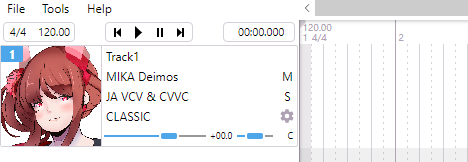
5. Select your preferred Resampler and Wavtool. Place them in the corresponding folder in your OpenUTAU root director ("Resamplers" & "Wavtools"). Select them from the dropdown menu in order to use them during synthesis.
bottom of page